
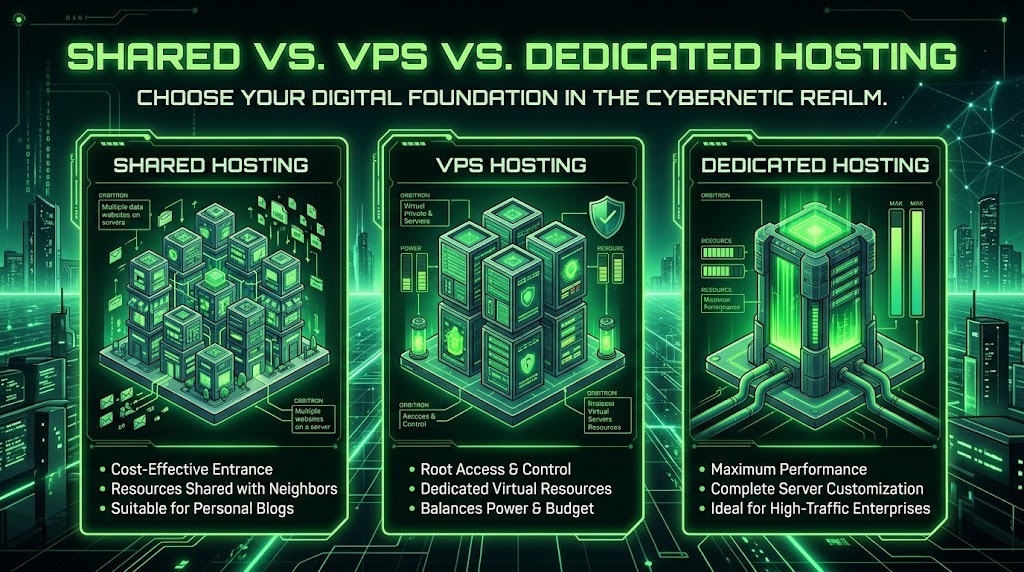
Understanding Shared Hosting
Shared hosting is the most common and affordable way to get a website online. In this setup, your website shares a single physical server with many other websites. All of those sites draw from the same pool of resources — CPU, memory (RAM), storage, and bandwidth.
Think of it like renting a room in a large apartment building. You have your own space, but you’re sharing the building’s electricity, water, and internet connection with everyone else who lives there. The hosting company manages the server, keeps the software updated, and handles most of the technical work behind the scenes. You mainly focus on your website content.
Key Characteristics of Shared Hosting
- Multiple websites run on the same server hardware.
- Resources (CPU, RAM, disk space, and bandwidth) are shared among all the sites on that server.
- The hosting provider takes care of server maintenance, security patches, and basic management.
- Plans are usually inexpensive and often come with a simple control panel (like cPanel) that makes it easy to install WordPress, manage files, and set up email.
- There are usually limits on how much traffic or resources your site can use before the host steps in.
Pros of Shared Hosting
- Low cost — It’s the cheapest option available, which makes it attractive for beginners or small projects.
- Easy to use — Most shared hosting plans include user-friendly tools and one-click installers, so you don’t need advanced technical skills.
- Managed for you — The hosting company handles server updates, security, and uptime monitoring.
- Quick to get started — You can often have a site live within minutes of signing up.
Cons of Shared Hosting
- Limited resources — Because you’re sharing the server, a sudden traffic spike on another site (or even on your own) can slow things down for everyone.
- Less control — You usually can’t install custom server software or make deep configuration changes.
- Performance can vary — If neighboring sites use a lot of resources, your site may feel slower at times.
- Security risk is shared — While hosts work hard to isolate accounts, a serious problem on one site can occasionally affect others on the same server.
- Growth limitations — Once your site starts getting steady traffic or needs more power, shared hosting can become restrictive.
Ideal Use Cases for Shared Hosting
Shared hosting works best for:
- New blogs and personal websites
- Small business sites with relatively light traffic
- Portfolio or brochure-style websites
- Beginners who want an affordable, low-maintenance way to get online
- Projects that don’t require advanced server configurations or high resource usage
If your site is just starting out, doesn’t expect heavy traffic, and you prefer simplicity over maximum control, shared hosting is often the smartest place to begin. Many people launch on shared hosting and only move to something more powerful later, once their traffic or technical needs grow.
Exploring VPS Hosting
VPS stands for Virtual Private Server. In simple terms, a VPS gives you a slice of a physical server that behaves like its own dedicated machine. The hosting company uses virtualization software to divide one powerful server into multiple isolated virtual environments. Each VPS gets its own guaranteed portion of CPU, memory, storage, and bandwidth.
This is the biggest difference from shared hosting. On shared hosting, every website on the server competes for the same pool of resources. On a VPS, your resources are allocated specifically to you. Even though you’re still on a shared physical machine, your virtual environment is separated from the others. What other people do on their VPS usually won’t affect your site’s performance the way it can on shared hosting.
You also get more control. Most VPS plans let you choose your operating system, install custom software, and configure the server closer to the way you want it. Many providers offer both managed and unmanaged options. Managed VPS means the host still handles a lot of the maintenance and updates for you. Unmanaged means you (or your developer) take on more of that responsibility in exchange for greater flexibility.
Advantages of VPS Hosting
- Better and more consistent performance — You have dedicated resources, so your site is less likely to slow down because of someone else’s traffic spike.
- Greater control and flexibility — You can install custom software, adjust server settings, and tailor the environment to your needs.
- Improved security isolation — Your virtual server is separated from others, which reduces the risk of problems on neighboring sites affecting yours.
- Scalability — It’s usually straightforward to upgrade your CPU, RAM, or storage as your site grows, without having to move to an entirely new type of hosting right away.
- Good middle ground on price — VPS plans cost more than shared hosting but are still much more affordable than a full dedicated server.
Disadvantages of VPS Hosting
- Higher cost than shared hosting — You’re paying for guaranteed resources and more control, so monthly fees are higher.
- More technical knowledge may be required — Especially with unmanaged plans, you’ll need to handle server updates, security, and troubleshooting yourself or hire someone who can.
- Still shares the physical hardware — While isolation is much better than shared hosting, you’re not on completely separate physical equipment. In rare cases, issues with the underlying server can still affect you.
- Management responsibility — Even on managed plans, you often have more to oversee than you would on basic shared hosting.
When to Consider VPS Hosting
VPS hosting starts to make sense when shared hosting begins to feel limiting. Common signs include:
- Your site is getting steady or growing traffic and occasionally slows down on shared hosting.
- You need to install custom software or specific server configurations that shared plans don’t allow.
- You want more consistent performance and better resource guarantees.
- You’re running applications that need more memory or processing power (for example, certain membership sites, online stores, or development environments).
- You’re ready to take on a bit more technical responsibility (or pay for managed support) in exchange for better performance and control.
In short, a VPS is the natural next step for many websites that have outgrown shared hosting but don’t yet need (or want to pay for) a full dedicated server. It offers a strong balance of performance, flexibility, and cost for growing sites.
The Benefits of Dedicated Hosting
Dedicated hosting means you get an entire physical server all to yourself. No other websites or customers share the hardware with you. Every bit of the CPU, memory, storage, and bandwidth on that machine is reserved for your site or application.
This is the biggest step up from both shared and VPS hosting. On shared hosting, you compete with many other sites for the same resources. On a VPS, you get a guaranteed slice of a shared physical server. With dedicated hosting, the whole server belongs to you. You (or your hosting provider, if it’s a managed plan) have full control over the operating system, software, security settings, and how the resources are used.
Main features usually include:
- Complete isolation from other customers
- Full root or administrator access
- The ability to choose or customize the operating system and installed software
- High resource limits (powerful CPUs, large amounts of RAM, and fast storage options)
- Options for managed or unmanaged service
Pros of Dedicated Hosting
- Maximum performance and reliability — Because nothing else is running on the server, your site gets consistent speed and doesn’t suffer from “noisy neighbors.”
- Complete control — You can configure almost everything exactly the way you need it, which is valuable for complex applications or strict security requirements.
- Stronger security and compliance — Full isolation makes it easier to meet certain security or regulatory standards.
- Predictable resources — You know exactly what hardware you’re getting and can plan around it.
- Better for high-traffic or resource-heavy sites — Large websites, busy online stores, and demanding applications often need this level of power.
Cons of Dedicated Hosting
- Higher cost — Dedicated servers are significantly more expensive than shared or VPS plans. You’re paying for an entire machine.
- More responsibility — Even with managed plans, there’s usually more technical oversight required than with simpler hosting types. Unmanaged dedicated servers demand real server administration skills.
- Can be overkill — Many websites simply don’t need this much power or control. Paying for a full server when a VPS would handle the traffic just fine can waste money.
- Scaling can be less flexible — Upgrading often means migrating to a new physical server rather than just increasing a few resources with a few clicks.
Who Should Choose Dedicated Hosting
Dedicated hosting makes the most sense for:
- High-traffic websites that regularly push the limits of VPS plans
- Large e-commerce stores processing many transactions and needing strong, consistent performance
- Businesses with strict security, compliance, or data-isolation requirements
- Companies running complex applications, custom software stacks, or multiple high-demand sites on one server
- Organizations that have the budget and either the in-house expertise or the willingness to pay for fully managed support
If your site has outgrown what a VPS can comfortably handle, needs guaranteed resources with no sharing at all, or has specialized technical requirements, dedicated hosting is the logical next step. For most smaller and mid-sized sites, though, the extra cost and responsibility aren’t necessary — a well-configured VPS is often the smarter balance of performance and value.
Choosing the Right Hosting Provider
Here’s a list of 11 hosting providers that offer Shared, VPS (or cloud/VPS-style), and Dedicated options, with a short note on each:
- HostGator
A long-time popular choice for beginners. It makes it easy to start on shared hosting and later upgrade to VPS or dedicated servers, though renewal prices can rise significantly. - Bluehost
Officially recommended by WordPress.org for many years. It’s beginner-friendly and offers a clear upgrade path from shared to VPS and dedicated plans, with a strong focus on WordPress sites. - InMotion Hosting
Known for solid U.S.-based support and reliable performance. It’s a good middle-ground option for small businesses that may eventually need VPS or dedicated resources. - A2 Hosting (Hosting.com)
Focuses heavily on speed, with “Turbo” servers that appeal to performance-conscious users. It offers shared, VPS, and dedicated plans with developer-friendly features. - DreamHost
A privacy-oriented host that appeals to developers and more technical users. It provides shared, VPS, and dedicated options with flexible configurations and a strong emphasis on open-source tools. - GoDaddy
One of the largest and most recognizable hosting brands. It offers shared, VPS, and dedicated hosting, making it convenient for absolute beginners, though it is often criticized for aggressive upselling. - InterServer
Known for competitive pricing and a unique “slice” system that lets you scale VPS resources gradually. It also offers shared and dedicated servers with a price-lock guarantee on many plans. - Hostwinds
Provides flexible managed and unmanaged options across shared, VPS, and dedicated hosting. It’s a solid choice if you want more control or the ability to add management services later. - ScalaHosting
Stands out for its managed VPS offerings and custom control panel (SPanel). It also provides shared and dedicated plans, making it especially appealing to users who want strong managed support as they grow. - Liquid Web
A premium, business-focused host best known for excellent managed VPS and dedicated server support. Shared hosting is more limited, but the company excels when high reliability and hands-on support matter most. - SiteGround
Highly regarded for its strong shared hosting performance, excellent customer support, and managed cloud/VPS-style plans. While traditional bare-metal dedicated servers are less emphasized, SiteGround offers powerful managed cloud solutions that serve a similar purpose for growing sites.
Hosting Providers Comparison Chart (Shared / VPS / Dedicated)
| Provider | Shared Starting (approx.) | VPS / Cloud Starting (approx.) | Dedicated Starting (approx.) | Best For | Key Strengths |
|---|---|---|---|---|---|
| HostGator | $3–$4/mo | $20–$30/mo | $90–$120/mo | Beginners & easy upgrades | Simple upgrade path, familiar brand |
| Bluehost | $3–$4/mo | $20–$40/mo | $80–$130/mo | WordPress users | Official WordPress recommendation |
| InMotion Hosting | $3–$5/mo | $15–$45/mo | $100–$150/mo | Small businesses & agencies | Strong U.S. support, reliable uptime |
| A2 Hosting | $3/mo | $30–$50/mo | $140+/mo | Speed-focused sites | Turbo servers, developer tools |
| DreamHost | $3–$4/mo | $10–$20/mo | $150+/mo | Developers & privacy-conscious users | Flexible plans, strong privacy stance |
| GoDaddy | $6–$8/mo | $10–$30/mo | $100+/mo | Absolute beginners | Huge brand recognition, many tools |
| InterServer | $2.50–$4/mo | $3–$6/mo (slice model) | $50–$80/mo | Budget users who want flexibility | Price-lock guarantee, scalable slices |
| Hostwinds | $5–$7/mo | $5–$12/mo | $80–$120/mo | Users wanting managed options | Flexible managed/unmanaged choices |
| ScalaHosting | $3–$5/mo | $15–$30/mo | $100+/mo | Managed VPS users | Excellent managed VPS + SPanel |
| Liquid Web | Limited / higher-end | $15–$40/mo | $150–$300+/mo | Businesses needing strong support | Premium managed support & high reliability |
| SiteGround | $3–$6/mo | $100+/mo (Cloud) | Limited / custom | Performance & support-focused users | Excellent support, strong shared + cloud |
Making the Right Choice for Your Needs
Choosing between shared, VPS, and dedicated hosting comes down to a few practical factors more than marketing claims.
Factors to consider
Start with traffic and resource needs. Shared hosting works fine if your site is small, gets moderate traffic, and doesn’t run heavy applications. The moment you start seeing slower load times during busy periods, or you need more control over the server environment, it’s time to look at VPS. Dedicated servers make sense when you have consistently high traffic, resource-intensive applications, or strict security and compliance requirements.
Control and technical comfort matter too. Shared hosting is the most hands-off option. VPS gives you root access and the ability to configure the server yourself (or hire someone to do it). Dedicated hosting puts you fully in charge of the entire machine, which is powerful but also means you’re responsible for more of the maintenance and security.
Reliability and isolation are the final pieces. On shared hosting, other websites on the same server can occasionally affect your performance. VPS isolates your resources so one noisy neighbor doesn’t slow you down. Dedicated removes the neighbors entirely.
Budget implications and performance requirements
Shared hosting is the cheapest entry point, often starting under $10 a month. It’s the right choice when budget is tight and performance demands are low.
VPS sits in the middle. You pay more (typically $20–$80+ per month depending on resources), but you get guaranteed CPU, RAM, and storage that scale with your needs. The performance jump is usually noticeable once your site outgrows shared hosting.
Dedicated servers cost significantly more—often starting in the low hundreds per month and climbing quickly. You only need this level when your traffic or application demands justify the expense. The performance is excellent, but the higher cost only makes sense if the site generates enough revenue or value to support it.
Conclusion and recommendations by use case
- New websites, blogs, small business sites, or portfolios → Start with shared hosting. It’s affordable, simple, and more than enough while you’re building traffic and testing ideas.
- Growing sites, online stores, membership sites, or apps that need more consistent performance → Move to VPS. It gives you better speed, more control, and room to scale without jumping straight to the highest price tier.
- High-traffic sites, complex applications, agencies managing multiple client sites, or businesses with strict uptime and security needs → Dedicated hosting is the safer long-term choice.
Most people do well starting on shared or a basic VPS and upgrading only when real performance issues or growth demand it. Matching the hosting type to your actual needs (instead of future projections) usually saves money and keeps things simpler.